
Getting Started with HaulerBoss

1. Share Your Quote Link
Post or send your personal quote link. Clients fill out all haul details in one simple form using verified addresses.
- Each hauler gets a personal quote link (unique URL).
- You post or send that link anywhere—Facebook groups, Messenger, email, text, website, etc.
What the client sees
-
A single-page form that collects:
- Pickup & delivery addresses (with verified mapping)
- Animal/haul details
- Dates, contact info, notes
What it accomplishes
- Standardizes all incoming quote requests.
- Eliminates back-and-forth messages.
- Ensures all jobs enter HaulerBoss with clean, verified data for mileage, routes, and pricing.
- Automatically puts the request into your Hauls → New list.
Why it's useful
- Every hauler always has a ready-to-share "intake form."
- Works perfectly in Facebook transport groups where shippers ask: "How much to haul from X to Y?"
- Avoids bad addresses, incomplete details, and time-wasting messaging.

2. Review Trip Details
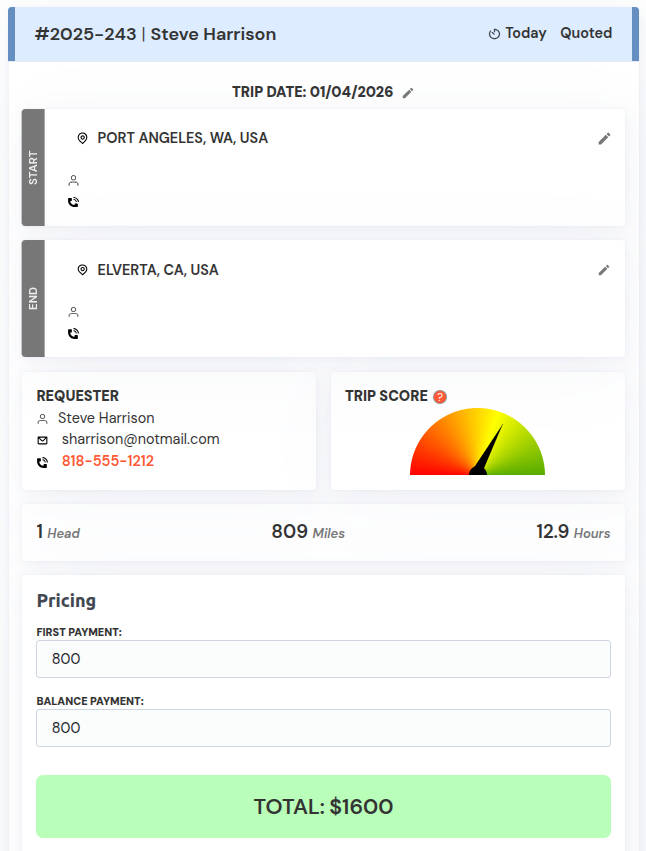
See all the info submitted—pickup/drop-off, animal type, dates, and more—already organized for you.
Core function
- Displays the complete haul request in a single, organized view.
- Aggregates all submitted information into a clear trip summary.
- Automatically calculates distance, drive time, and trip metrics from verified addresses.
What the hauler sees
- Pickup and drop-off locations with map-ready addresses.
- Animal type and head count.
- Trip date and timing details.
- Shipper contact information (name, phone, email).
- Auto-generated mileage, estimated hours, and Trip Score.
- Payment status and haul progress at a glance.
What it accomplishes
- Eliminates guessing, re-checking messages, or searching through texts.
- Ensures quoting, routing, and scheduling are based on accurate, complete data.
- Provides a single source of truth for the entire haul lifecycle.
- Reduces errors caused by missing or unclear trip details.
Why it's useful
- Everything you need to make a decision is already organized for you.
- Speeds up quoting and planning with zero manual cleanup.
- Professionalizes how you review and manage transport jobs.
- Replaces screenshots, notes, and inbox chaos with a clean workflow.
3. Use Smart Pricing + Trip Score
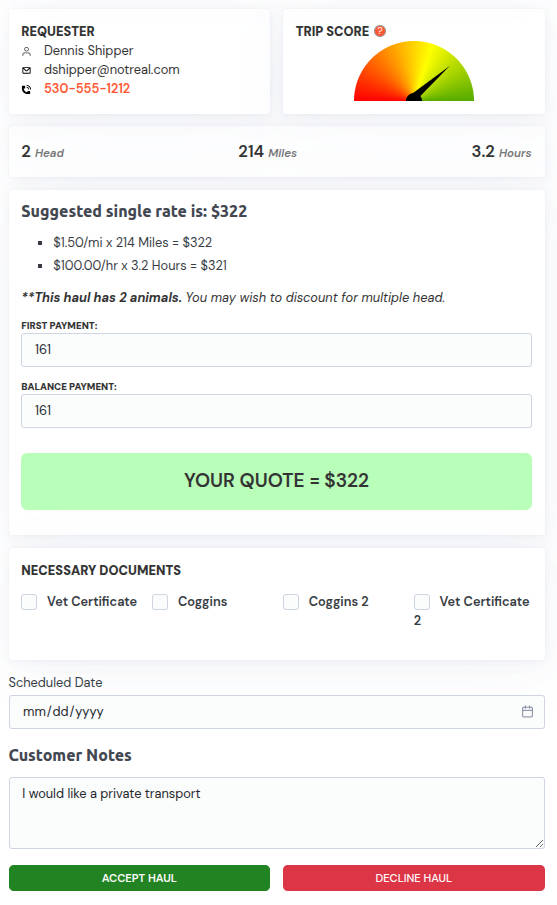
Get suggested pricing based on mileage and route data. Use the Trip Score to spot unusually slow or complex trips.
Core function
- Automatically generates suggested pricing using real mileage, routing, and trip conditions.
- Highlights trip difficulty and risk with a visual Trip Score.
- Helps haulers make informed pricing decisions quickly and consistently.
What the hauler sees
- Mileage-based pricing recommendations tailored to each haul.
- Route complexity indicators such as long rural stretches, mountain passes, or indirect paths.
- A Trip Score gauge showing whether a job is straightforward, moderate, or unusually challenging.
- Clear indicators that help adjust rates up or down as needed.
What it accomplishes
- Removes guesswork from quoting.
- Ensures pricing matches the true effort and time the trip requires.
- Reduces undercharging on difficult routes and overcharging on simple ones.
- Adds consistency across all quotes, improving professionalism and trust.
Why it's useful
- Saves time by calculating what would otherwise take multiple tools and maps.
- Helps prevent low-profit hauls by revealing hidden trip challenges.
- Gives haulers confidence that their pricing is fair, competitive, and data-driven.
- Supports better decision-making—especially on unfamiliar routes or long-distance hauls.
4. Approve and Send Quote
Approve the quote and send it with one click. No copy-pasting, no typing out details manually.
Core function
- Allows haulers to approve a prepared quote and send it instantly.
- Automatically includes all trip details, pricing, and terms.
- Sends a professional, standardized quote without manual formatting.
What the hauler sees
- A finalized quote ready to send with one click.
- Clearly presented pricing and trip information pulled directly from the haul record.
- Confirmation that the quote has been sent to the correct client.
- Quote status tracking once delivered.
What it accomplishes
- Eliminates copy-and-paste errors.
- Removes the need to retype addresses, dates, or pricing.
- Ensures every quote is accurate, complete, and consistent.
- Speeds up the time from request to client response.
Why it's useful
- Saves time on every quote you send.
- Prevents mistakes caused by manual entry.
- Presents a more professional experience to clients.
- Helps you respond faster and secure jobs before competitors do.

5. Collect Deposit Online
Your client gets a secure link to pay the deposit directly to your account—no chasing, no payment confusion.
Core function
- Generates a secure payment link for client deposits.
- Sends the link directly to the client as part of the booking process.
- Deposits funds straight into your connected payment account.
What the client sees
- A simple, secure online payment page.
- Clear deposit amount and trip details.
- Standard credit or debit card payment options.
- Immediate confirmation after payment is completed.
What it accomplishes
- Removes the need to chase down deposits.
- Eliminates confusion over payment instructions or methods.
- Confirms client commitment before the haul begins.
- Updates payment status automatically inside HaulerBoss.
Why it's useful
- Saves time and follow-ups.
- Reduces no-shows and last-minute cancellations.
- Keeps payments organized and tied directly to each haul.
- Provides a professional, modern payment experience for clients.

6. Manage Trip in One Workspace
Each trip has its own area where you track document uploads (Coggins, Vet Certificate), contact info, and all client interactions.
Core function
- Creates a dedicated workspace for every haul.
- Centralizes all documents, client details, and communication in one place.
- Keeps the entire trip organized from start to finish.
What the hauler sees
- Upload areas for required documents such as Coggins and Veterinary Certificates.
- Shipper and receiver contact details neatly arranged.
- A running log of client interactions and updates.
- Trip status, payment progress, and notes all in a single view.
What it accomplishes
- Replaces scattered conversations, screenshots, and paperwork.
- Makes compliance documents easy to store, find, and verify.
- Provides continuity even if a trip spans days or weeks.
- Ensures nothing important is lost or overlooked.
Why it's useful
- Gives each haul a clean, professional workspace.
- Simplifies multi-day and long-distance transports.
- Reduces stress by keeping every detail where it belongs.
- Helps haulers stay organized, accurate, and ready for any client question.

7. Recieve and track Payments
When delivery is complete or balance is due, send the final payment link from the same dashboard and verify all haul payments.
Core function
- Sends secure payment links for balances due or final payments.
- Manages all haul-related payments from a single dashboard.
- Connects payment activity directly to each trip.
What the hauler sees
- Clear payment status indicators for each haul.
- Deposit and balance history tied to the trip record.
- Confirmation when payments are completed.
- A single place to verify that a haul is fully paid.
What it accomplishes
- Eliminates manual payment tracking.
- Prevents missed or forgotten balances.
- Keeps payments aligned with the correct trip.
- Creates a reliable record of all financial activity per haul.
Why it's useful
- Saves time reconciling payments.
- Reduces payment confusion for you and your clients.
- Improves cash flow visibility.
- Ensures no trip is closed without proper payment confirmation.

8. Build your Itinerary
Set your routes with haul waypoints as well as overnights and rest stops.
Core function
- Lets you plan your full transport route inside one workspace.
- Adds waypoints for pickups, drop-offs, rest stops, and overnight locations.
- Creates a structured itinerary that updates as your trip evolves.
What the hauler sees
- Interactive route planning with mapped waypoints.
- Dedicated fields for stops, overnights, timing, and scheduling notes.
- A clear visual sequence of events from start to finish.
- Tools to adjust, reorganize, or refine the route as needed.
What it accomplishes
- Transforms raw trip details into a clean, organized travel plan.
- Helps manage complex or multi-leg hauls with confidence.
- Ensures each stop—pickup, drop-off, rest, or overnight—is accounted for.
- Provides clarity for planning, time estimates, and client communication.
Why it's useful
- Makes long-distance or multi-day hauls easier to structure.
- Reduces planning time by keeping all route details in one place.
- Helps avoid missed stops or scheduling mistakes.

9. Drive with your Itinerary
Navigate, communicate with contacts on the route and mark stops as completed.
Core function
- Provides a live, trip-ready itinerary you can use while driving.
- Guides you through each waypoint with mapped routes and clear sequencing.
- Allows you to mark stops as completed as you progress.
What the hauler sees
- Turn-by-turn navigation integration linked to each stop in the itinerary.
- Contact info for shippers, receivers, and overnight hosts—ready to call or message.
- A simple interface to check off stops as they are completed.
- A real-time view of where you are in the trip workflow.
What it accomplishes
- Keeps your entire trip organized while you're on the road.
- Makes it easy to stay in touch with clients along the route.
- Ensures no stop, pickup, or drop-off is missed.
- Creates a clear record of trip progress.
Why it's useful
- Reduces stress during long or multi-stop hauls.
- Helps maintain smooth communication with all contacts.
- Streamlines trip execution with a structured, mobile-friendly workflow.
- Gives haulers a professional, dependable tool they can trust while driving.